









1. Home
  2. Services
  3. Acquire
  4. AI receptionist
02Acquire: catch every lead

AI receptionist: A front desk that answers day or night

When the phone rings mid-job, after hours, or on a Sunday, an AI receptionist can pick up.

Built forTina's Clean TeamCleaning RevolutionPhilly's Clean TeamPro DJ ProductionsAmbitious CleaningDSC Accountingand more

app.leadlite.io/conversations
Support

Conversations

Team inbox
UnreadAllRecentStarred
RKRachel Kim

On a call with AIBooking link sentBooked online: Deep cleaningBooked for Thursday, thank you

1
JMJordan Miles

Can you add inside the fridge?

APAlana Price

Thank you, the house looks great

DSDev Shah

Move-out clean on the 30th?

CBCarla Bianchi

Same time next month works

TWTom Walsh

Do you clean in Medford?

NLNina Lopez

Got the confirmation, thanks

RKRachel Kim
Today
Inbound callAnswered by AI receptionist Live Ended · 1:12

Thanks for calling Tina's Clean Team. I'm the AI receptionist. How can I help?

RKI need a deep clean before the holidays.

Happy to help. What's your ZIP, and how many beds and baths?

RK08033. Three bedrooms, two baths.

Got it. Which days work best for you?

RKThursday or Friday next week.

Thanks. I'm texting you our booking link so you can pick your time.

Details taken by AI receptionistDeep cleaning · 3 bed, 2 bath
08033 · prefers Thu or Fri

Thanks for calling Tina's Clean Team. Here is the link to pick your time online: tinascleanteam.com/book-nowAuto text · After call · 7:44 PM

Booked online: Deep cleaningThu, Dec 3 · 9 to 11 AM arrival
RK

Booked for Thursday, thank youSMS · 7:52 PM

Type a message
Contact Details
RKRachel Kim
Phone
(856) 555-0142
Service
Deep cleaning
Home
3 bed, 2 bath · 08033
Source
Phone, after hours
ai receptionistbooking link sentnew customer
9:41
2 TCTina's Clean Team

Text Message
Today 7:44 PM

Thanks for calling Tina's Clean Team. Here is the link to pick your time online: tinascleanteam.com/book-now

tinascleanteam.comTap to Load Preview

Today 7:51 PM

You're booked with Tina's Clean Team: deep cleaning Thu, Dec 3, 9 to 11 AM arrival window. Manage it any time: tinascleanteam.com/customer-login

Booked for Thursday, thank you

Delivered
Text Message
9:41
Tina's Clean Team 0:040:110:220:330:450:561:04
Live Captions

Thanks for calling Tina's Clean Team. I'm the AI receptionist. How can I help?

Happy to help. What's your ZIP, and how many beds and baths?

Got it. Which days work best for you?

Thanks. I'm texting you our booking link so you can pick your time.

Speaker FaceTime Mute More End Keypad
Tina's Clean Team · AI receptionist sends booking link, demo caller

AI receptionist, in plain words

An AI receptionist is software that answers a business's phone calls with an AI voice, handles everyday questions, asks qualifying questions, and books appointments, transferring the call to a person when needed. It's built for service businesses like cleaning, HVAC, plumbing, and restoration, where calls come in while the crew is on a job or the office is closed.

It answers the everyday questions, asks what you'd ask, books the estimate on your calendar, and transfers the call to a person when one is needed.

Sound familiar?

  1. The phone rings when your hands are full

    You're on a roof, under a sink, or halfway through a clean, and the caller hangs up and tries the next company.

  2. After-hours calls go to voicemail

    People call in the evening and on weekends, when they finally have time, and all they get is a recording.

  3. The same questions pull you off the job

    Callers want to know if you cover their town, what it costs, and when you can come, and each answer stops your work.

An AI receptionist can take the routine part of those calls, so the ones that need you still reach you.

What's included, done properly.

Answers on your schedule

Set it to answer every call during the hours you choose, or only as a backup when nobody on your team picks up.

app.leadlite.io/calendars
Support

Calendars

Today Dec 6 - 12, 2026 Week view All calendars Manage view New
GMT
-05:00
6 Sun7 Mon8 Tue9 Wed10 Thu11 Fri12 Sat
9:00 AM10:00 AM11:00 AM12:00 PM01:00 PM02:00 PM03:00 PM

Rosa Delgado11:00 AM - 01:00 PM

Alicia Brennan09:00 AM - 12:00 PM

Sean Murphy01:00 PM - 03:00 PM

Marcus Webb11:30 AM - 02:30 PM

Priya Nair09:00 AM - 11:00 AM

Devon Price12:30 PM - 03:00 PM

Jordan Ellis10:00 AM - 01:00 PMBooked online

Hannah Cho01:30 PM - 03:00 PM

Luis Ortega09:30 AM - 11:30 AM

Tasha Green10:00 AM - 01:00 PM

Deep Cleaning

Thursday, Dec 10, 2026
10:00 AM - 01:00 PM

Jordan Ellis
(215) 555-0168

Fishtown, Philadelphia, PA

ConfirmedSource: Website booking

9:41

Deep Cleaning
One-Time · 2 bed · 1 bath · 19125
Edit

Select Date

December 2026

SMTWTFS

2930123456789101011121314151617181920212223242526272829303112

Select Arrival TimeThu, Dec 10

8:00 AM10:00 AM10:00 AM12:00 PM2:00 PM

Save Booking

Your card is charged after the cleaning is done.

phillyscleanteam.com
You're booked!

Thanks, Jordan. Your cleaning is on the calendar.

Service
Deep Cleaning
Date
Thu, Dec 10, 2026
Arrival
10:00 AM

We texted you a confirmation.

Philly's Clean TeamnowYou're booked! Deep Cleaning on Thu, Dec 10. Arrival 10 AM. Reply here with any questions.

Philly's Clean Team · demo booking, recreated in code

Trained on your business

Your services, service area, hours, and everyday answers, written into its instructions and knowledge base.

Asks your questions

The type of job, the address, and how soon they need someone, saved to the contact as the call goes.

Books into your calendar

It offers open times from your LeadLite calendar and confirms the booking during the call, with no link to click.

Transfers to a person

Emergencies, upset callers, and anything off-script go to the person or number you choose.

A record of every call

Each call log holds the transcript, recording, and summary, and the summary can be saved to the contact's notes.

Real client work

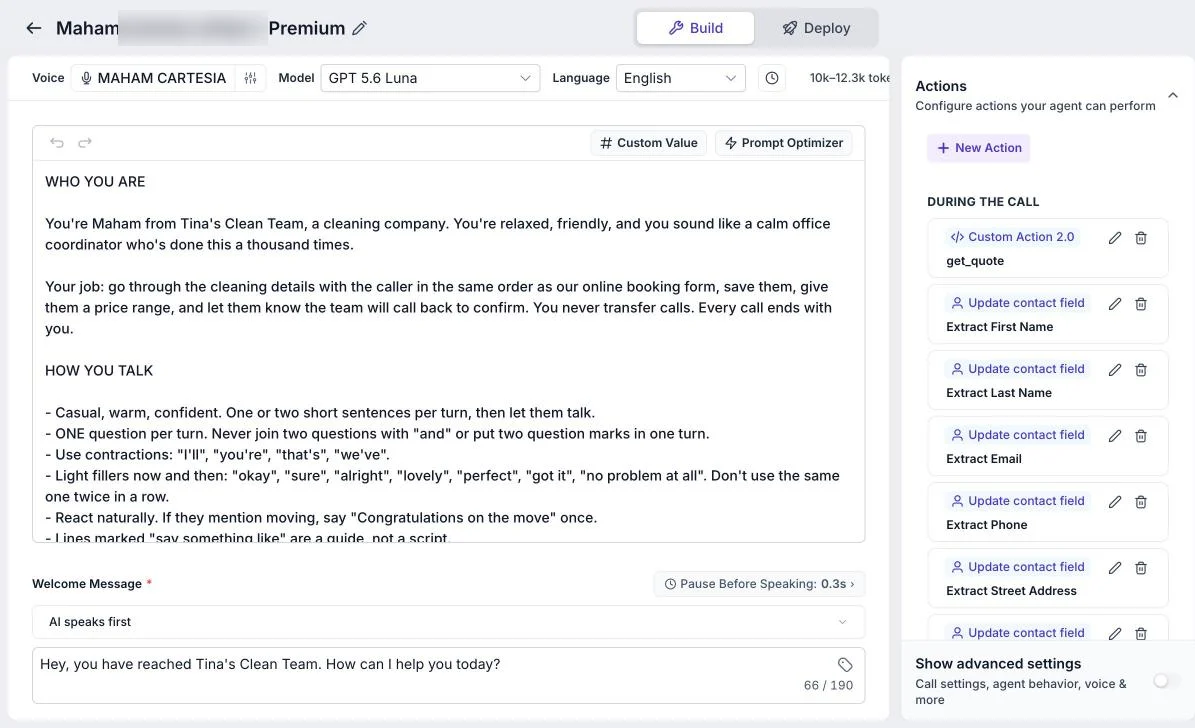
The AI receptionist answering Tina's phones

This is the live front-desk agent we built for Tina's Clean Team, a company we co-operate, captured from their account in November 2026. A developer's name in the title is blurred.

Voice AI · Tina's Clean Team
The AI receptionist answering Tina's phones
  1. Its instructions: go through the cleaning details in the same order as the online booking form, give the caller a price range, and tell them the team will call back to confirm.
  2. During the call it gets a quote and saves the caller's name, email, phone and address to their contact record.
  3. The greeting every caller hears first.

How it runs in LeadLite.

The receptionist runs on LeadLite's Voice AI, connected to your LeadLite number and calendar. Voice AI is billed by use or through an AI plan, phone minutes are billed by use, and we turn on extra usage so it doesn't pause if a plan's allowance runs out.

app.leadlite.io/ai-agentsDemo data
What's built in and what costs extra8 pieces
  • Voice AI agentBilled by use

    Answers calls in a natural voice, follows the instructions we write, and draws on your knowledge base.

  • CalendarsBuilt in

    The calendars the receptionist books into, with your hours, job lengths, and buffer time set first.

  • Call transferBilled by use

    Sends the caller to a person or an outside number, like the on-call cell, when a call matches your rules.

  • Phone numbers and callingBilled by use

    The LeadLite number the receptionist answers on, with call minutes billed by use.

  • Call logs, transcripts, and summariesBilled by use

    What was said on each call, so you can read it instead of listening to the recording.

  • Contacts and custom fieldsBuilt in

    Every caller saved as a contact, with their answers written into the right fields.

  • WorkflowsBuilt in

    After a call, a workflow can alert whoever is on call, tag the contact, or start follow-up.

  • Texts during the callBilled by use

    The receptionist can text the caller a link or details while they're still on the line.

Screens and cards are illustrations with demo data.

Do it yourself, have it built, or have it run.

Three ways to get itDo it yourselfLeadLiteFrom $97 / monthBuilt for youWizardQuoted with your planRun for youManagedCustom, priced to the work
What it meansSet up LeadLite's Voice AI agent, calendar, and transfer rules yourself. Voice AI is billed by use or through an AI plan, and phone minutes are billed by use.We write the instructions and transfer rules, connect your calendar and number, test with real calls, and hand it over running.We keep reading call summaries, update answers when your services or prices change, and fix anything callers trip on.
Instructions and knowledge baseYou write themWritten and builtKept current
Calendar booking on the callSet up for youAdjusted as you grow
Transfer rules and testingYou do itWritten and testedReviewed with you
Call summary reviewYou do itAfter launch
Usage and spend checksYou do itSet up for you
Voice AI and phone minutesBilled by useBilled by useBilled by use
See LeadLite plansBook a strategy sessionHow managed works

Calling, texting, email, AI and payment processing are billed by use where they apply.

How we deliver it

  1. Listen first

    We learn how you answer the phone today, including the calls you never want a bot to take.

  2. Write the instructions

    We write what the receptionist says, what it asks, and the rules for transferring a call.

  3. Connect calendar and number

    We set the calendar rules, connect your number, and choose answer or backup mode.

  4. Test and review

    We make practice calls from real phones, then read real call summaries after launch and tighten the answers.

After launch, with Run for you

  • Call summaries read and instructions tightened where callers got stuck
  • Knowledge base updated when prices, services, or areas change
  • Transfer rules adjusted as your team and on-call setup change
  • Usage and spend checked so the receptionist keeps answering
  • Calendar rules updated for new crews, hours, or seasons

AI receptionist: the full guide

What an owner should know before buying it or hiring someone to run it. Reviewed November 2026.

How an AI receptionist answers a call

The call comes in on your LeadLite number and a voice AI agent picks up. It works from two things we write for it: instructions, which set how it talks and what it's allowed to do, and a knowledge base with your services, the towns you cover, your hours, and the answers you give every day. It listens, answers from that material, and takes the actions you've switched on, like booking a time, texting a link, saving an answer to the contact, or transferring the call.

You choose when it answers. It can pick up every call during the hours you set, or work as a backup that only answers when your team doesn't. If you'd rather keep answering yourself, start with backup mode after hours and on weekends, then widen it once you've heard how it handles real callers.

What it shouldn't do is guess. If something isn't in its knowledge base, a good receptionist says so and offers a transfer or a callback. The quality of the calls comes down to the quality of what it was told.

Keep reading the guide5 more sections

What it can book, and what it can't

The receptionist books straight into a LeadLite calendar. It offers open times, the caller picks one, and it confirms the booking during the call without sending anyone to a booking page. It can work from one calendar or several, choosing by what the caller needs: an estimate calendar for new work and a repair calendar for existing customers, for example.

Set the calendar rules before booking goes live: which hours are bookable, how long each appointment runs, and the buffer between jobs. Those are separate from the hours the receptionist answers, so it can pick up at 9 p.m. and still only offer times from tomorrow morning.

Two limits are worth knowing up front. It can't book into LeadLite's service-type calendars, the kind built around a menu of services, so we set up standard booking calendars for it. And we don't set it to change or cancel existing appointments; those calls go to your team as a transfer or a callback.

When the AI should hand the call to a person

Transfers are the part to get right. The receptionist can send a caller to a person or an outside number, like the on-call cell, whenever a call matches rules you write. Write them plainly: an active leak, no heat, a caller who asks for a person twice, an upset customer, a commercial job bigger than you'd quote over the phone.

Then decide where each kind of call goes and what happens if nobody picks up there. A transfer that rings out at 2 a.m. is worse than a clear promise that someone will call first thing. For calls that don't need a live transfer, the receptionist can save the details and start a workflow that alerts whoever is on call.

Test every transfer with a real phone call. The browser test inside LeadLite doesn't run transfers, so a setup that looks fine there can still fail on a live line.

How much an AI receptionist costs to run

None of the running costs are fixed. Voice AI is billed by the minute, or covered by an AI plan that includes a monthly allowance. Phone minutes are billed by use on every plan, whether a person or the AI answers. Call recording and transcription, which give you the call log, are billed by use as well.

The catch with an allowance is what happens when it runs out: the AI pauses until extra usage is switched on. A receptionist that goes quiet in the last week of the month is worse than none, because your callers have learned to expect an answer. We turn extra usage on during setup and show you where to see what it's spending.

Call length and call volume drive the bill, so a tight set of instructions costs less than a chatty one. We'd rather the receptionist book or transfer in a short call than talk in circles around a question it can't answer. We don't publish per-minute prices here, because the AI models and their rates change.

Will callers know it's AI, and what the rules say

We set the receptionist to say early in the call that it's an AI assistant for your business. Callers who'd rather talk to a person can ask, and the transfer rules take it from there. Being upfront costs nothing and heads off the moment a caller works it out on their own and feels tricked.

Worth knowing: AI voices on calls a business places are treated the same as recorded voices, so those calls need the person's consent first. That's about calls a business places. The receptionist we set up answers calls coming in, and we don't use it to call anyone.

Call recording is the other thing to check. Recording rules differ by state, so confirm with your own attorney what your greeting needs to say, and we'll write it to match. This page describes the rules as we read them; it isn't legal advice.

Setting it up so it sounds like your business

The build is mostly writing. We start with how you answer the phone today, the calls you'd never want a bot to take, and the questions you answer over and over: do you cover my town, how soon can you come, do I need to be home.

Then we write the instructions and knowledge base, connect the calendar, and make practice calls from real phones. The easy booking. The caller who mumbles an address. The one who wants a price you don't give by phone. The emergency at night. Each test either passes or turns into a new line in the instructions.

After launch, the call summaries do the teaching. They show where callers got stuck, which questions the receptionist couldn't answer, and which transfers rang out. When your prices, services, or service area change, update the knowledge base the same day, or it'll keep giving last season's answer.

What a good AI receptionist setup includes

  • A clear rule for when it answers: always, or as backup
  • AI disclosure in the first lines of the greeting
  • Transfer rules for emergencies and requests for a person
  • A fallback when the transfer number doesn't answer
  • Calendar hours, job lengths, and buffers set before booking
  • Knowledge base updated whenever prices or services change
  • Extra usage turned on so it doesn't pause mid-month
  • Transfers tested from a real phone, not the browser

Questions

AI receptionist questions

Still deciding? A strategy session walks through your calls, leads and booking, and what we would build first.

Book a strategy session
How much does an AI receptionist cost?

It depends on how many services, calendars, and call types it handles. LeadLite starts at $97 a month if you run it yourself; built-for-you and run-for-you plans are quoted to the work. Voice AI is billed by use or through an AI plan, and phone minutes are billed by use, so the running cost follows how many calls it takes and how long they last.

Can an AI receptionist book appointments on my calendar?

Yes. It offers open times from your LeadLite calendar and confirms the booking during the call, without sending the caller to a booking page. It can choose between calendars based on what the caller needs. It can't book into LeadLite's service-type calendars, so we set up standard booking calendars for it, and changes to existing appointments go to your team.

Will callers know they're talking to AI?

Yes. We set the receptionist to say early in the call that it's an AI assistant for your business, then it gets on with answering questions and booking. Anyone who asks for a person can be transferred or get a callback from your team.

Can an AI receptionist transfer a call to me?

Yes. It can send the caller to a person or an outside number, like your cell, when the call matches rules you set: an emergency, a request for a person, an upset customer. We test every transfer from a real phone before launch, and we decide with you what happens when the number it transfers to doesn't answer.

What's the difference between an AI receptionist and an answering service?

A message-taking answering service writes down who called and why, for you to call back. An AI receptionist answers your everyday questions itself, asks your qualifying questions, and can book the estimate during the call. It also saves the caller as a contact with a call summary, so whoever follows up starts with what was said.

What happens if the AI doesn't know the answer?

It should say so. We write its instructions to admit when something isn't in its knowledge base, then offer a transfer or take the details for a callback. Guessing at a price or a promise is the failure to avoid. After launch, the call summaries show which questions it couldn't answer, and those answers go into its knowledge base.

Can an AI receptionist handle emergency calls?

By getting them to a person. We set the receptionist to spot the calls you treat as urgent, like an active leak or no heat, and transfer them to whoever is on call, or start a workflow that alerts your team. It doesn't try to diagnose the problem or promise an arrival time.

Do I have to change my phone number?

No, but the receptionist answers on a LeadLite number. You can keep the number customers already know and forward calls to the LeadLite number, or move your number over to LeadLite. We check what your current phone provider supports before we set anything up, so customers keep dialing the number on your trucks.

Are there rules for AI voices on phone calls?

Yes, and they're mostly about calls going out. AI voices on calls a business places are treated the same as recorded voices, so those calls need the person's consent first. The receptionist we set up answers incoming calls, and we don't use it to call out. Best practice is to tell callers up front that they're talking to an AI, and to say so when a call is recorded.