









Estimate follow-up: the full guide
What an owner should know before buying it or hiring someone to run it. Reviewed November 2026.
How long to wait before following up on a quote
Start sooner than feels polite. The first follow-up has a simple job: check that the quote arrived, opened properly and made sense. A short text the same evening or the next morning ('Just making sure the estimate came through. Any questions on it?') catches the quote that landed in spam and the customer who has one question standing between them and a yes.
After that, the timing should match how long your customers take to decide. A one-time clean or a drain repair might be decided in a day or two. A roof, a full repaint or a restoration job waiting on an insurance adjuster can take weeks, and the follow-up should stretch out to match: a few touches early, wider gaps after that, then a last check-in.
We set the timing with you based on what you've seen in your own business, then adjust it once real quotes start moving through. Your own accepted and lost quotes are a better guide than any rule of thumb.
Keep reading the guide5 more sections
What a quote follow-up text should say
Short, specific and easy to answer. Name the job, give one reason to reply, and make replying simple. 'Hi Dana, it's Sam at Brightside Cleaning. Any questions on the deck staining estimate? Happy to walk through the options.' does more work than a paragraph about your values. Each message after that should give the customer something: an answer to a common worry, a note about when you could start, a photo of a similar job, or a plain question.
Email carries the detail: the estimate itself, the scope, what's included and what isn't. Texts carry the nudge. A mix reaches the customer wherever they look first, and keeps any one channel from feeling crowded.
Skip the pressure lines. 'Prices go up Friday' only belongs in a follow-up if prices really do go up Friday. A check-in that sounds like the person who stood in their kitchen reads as good service. A fake deadline reads as a sales tactic, and customers comparing three quotes can tell the difference.
Can I see if a customer opened my estimate?
With estimates sent from LeadLite, yes. Each one moves through statuses: sent, viewed, accepted, declined and invoiced. Those statuses are what make smart follow-up possible, because a customer who opened the quote is in a different place than one who never saw it.
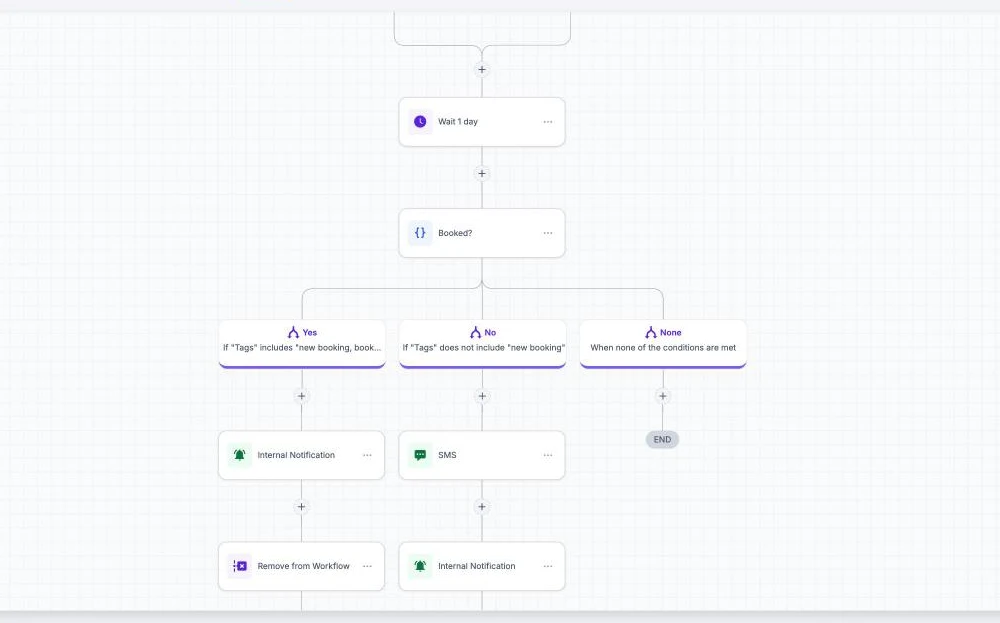
So the follow-up branches. Not opened: check that it arrived, and resend it by text in case the email went unseen. Opened but not answered: ask whether they have questions, or offer a quick call to walk through the options. Accepted or declined: the reminders stop, and accepted estimates turn into an invoice and a booked job.
One limit to know. A viewed status tells you the estimate was opened. It doesn't tell you how long they spent on it, which parts they read, or how interested they are. Treat it as a good moment to reach out, and let the customer's reply tell you the rest. For the same reason, don't open the call with 'I saw you looked at it.' Ask if they have questions.
How many times to follow up, and when to stop
There's no right number for every trade. What matters is spacing and stopping. Spread the touches over the time a customer in your trade takes to decide, switch between text and email, and stop the moment they answer, accept, decline or opt out.
Stopping is the part that's easy to get wrong. If an accepted estimate doesn't end the sequence, a happy customer gets 'still thinking it over?' the day after they said yes. LeadLite's estimate statuses end the follow-up on their own, and a STOP reply sets do-not-disturb on the contact, so any texts already queued fail instead of sending. If you use the AI follow-up assistant on a conversation, it should be the only thing following up with that customer, so they don't get two sets of messages.
End with a last, polite check-in before the quote is marked lost: 'Should I close this one out, or keep it open for you?' It gives a quiet customer an easy way to tell you where they stand, and it gives you a clean list of what's really open.
Turning an accepted estimate into a booked job
A yes is only worth something once there's a date and an invoice behind it. In LeadLite, an accepted estimate can be converted to an invoice, and the deal it's linked to moves to the next stage of your pipeline. That stage change can start what comes next: a text to set the start date, a task for whoever schedules the work, a thank-you.
For bigger jobs where you want a signature on the scope and terms, send a proposal instead. Plain estimates are accepted or declined with a click. Proposals built from documents and contracts are signed, with a record of who signed and when. Where we'd draw the line: estimates for quick, standard work, and proposals for anything with options, conditions or a long scope.
On the road, the LeadLite mobile app can build and send an estimate from the customer's driveway. Once an estimate is sent, it can't be edited, so a change means sending a new one. That's a small hassle, but it also keeps a clean record of exactly what the customer saw.
If your estimates go out from other software
Follow-up has to start from something LeadLite can see. If you send estimates from LeadLite, that's the estimate itself. If you quote in Jobber, its connection to LeadLite syncs contact details only, so a quote sent from Jobber won't start the follow-up by itself.
There are two clean ways around it. Send estimates from LeadLite for the jobs you want followed up, or have whoever sends the quote move the deal to 'quote sent' in your LeadLite pipeline, which starts the same follow-up. The second takes one tap from the phone, and it's a habit worth building anyway, because your pipeline then shows every open quote in one place.
Either way, we check your setup before we build anything and tell you plainly what will connect and what won't. Follow-up that fires on the wrong quotes, or keeps texting someone who already signed in another system, does more harm than no follow-up at all.
What a good estimate follow-up setup includes
- Follow-up starts automatically when a quote is sent
- Different messages for opened and unopened estimates
- Text and email mixed, spaced to your sales cycle
- Accepted, declined and STOP replies end the sequence
- A call task for every high-value quote
- A last check-in before a quote is marked lost
- Lost quotes kept with a reason, for later campaigns
- Accepted estimates turned into invoices without retyping