


1. Home
  2. Services
  3. Reach
  4. Website design
  5. Website security
01Reach: get found

Website security: The security basics, handled for you

The trouble on a small business site starts small: an expired certificate, software nobody updated, a contact form buried in spam, a login an old employee still has.

Built forTina's Clean TeamCleaning RevolutionPhilly's Clean TeamPro DJ ProductionsAmbitious CleaningDSC Accountingand more

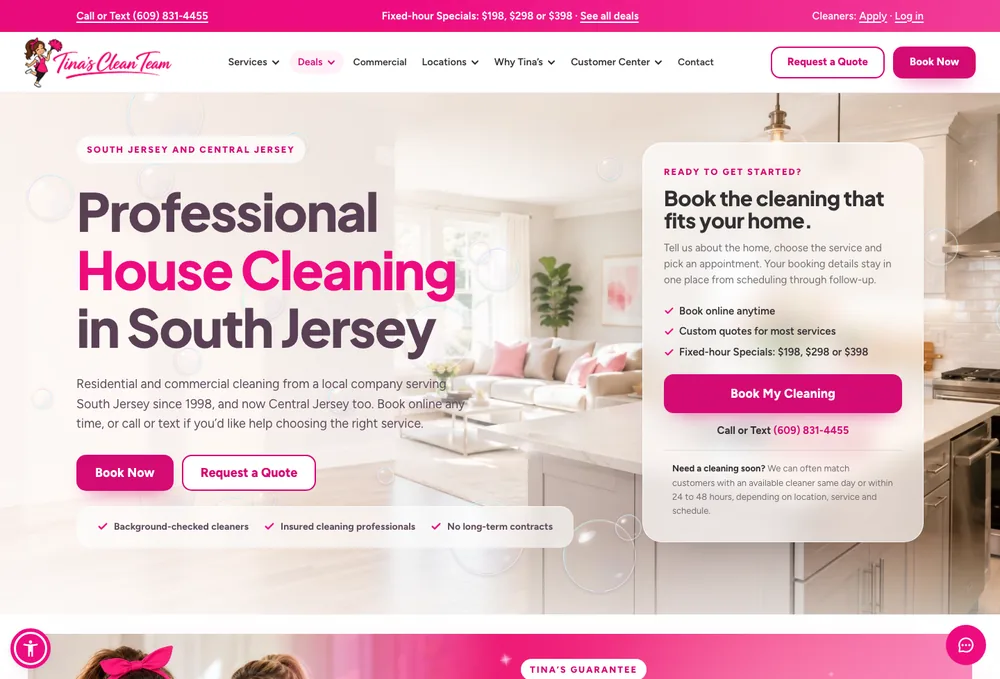
tinascleanteam.com
Tina's Clean Team home page on desktop
9:41
9:41
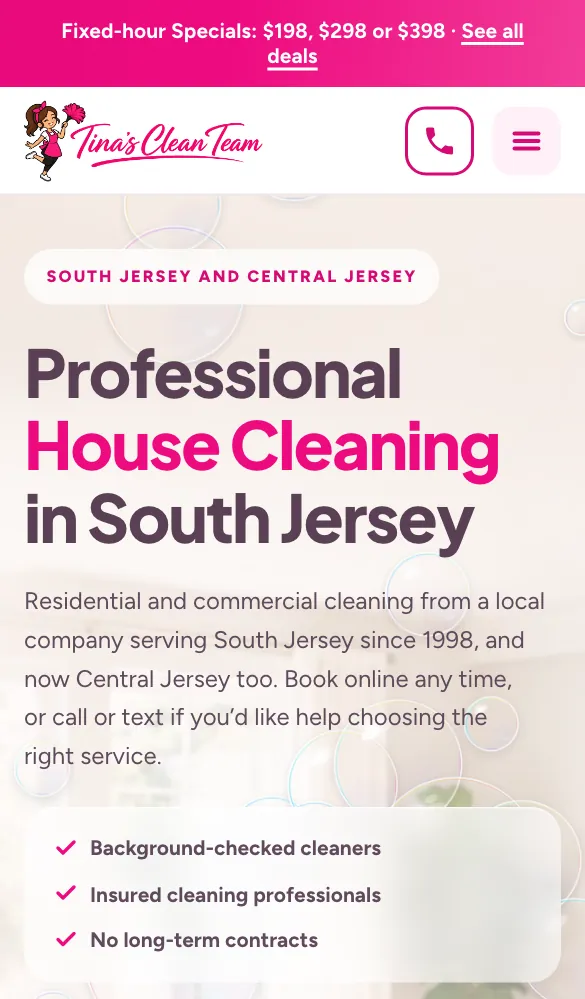
Tina's Clean Team home page on a phone
tinascleanteam.com
Tina's Clean Team · live site, real desktop and iPhone captures

Website security, in plain words

Website security for a small business is the routine work that keeps a site's connection encrypted, its forms screened for spam, its logins limited to the right people, and its software current, plus backups where the platform has them. It's for service business owners who want those basics handled without becoming the IT department.

We take care of the basics and tell you plainly what security work can and can't do.

Sound familiar?

  1. Your form is full of junk

    Real quote requests get buried under spam, and sooner or later a real one gets missed.

  2. Browsers call your site not secure

    An expired or missing SSL certificate puts a warning in front of visitors before they see a single service.

  3. Nobody's updating anything

    The site was built years ago, nothing has been updated since, and you don't know whether that's a problem.

Each has a plain fix, and the work starts with what a visitor sees first: the padlock and the form.

What's included, done properly.

A security check, then the fixes

We check your certificate, forms, logins, domain, and software as they are today, and close the gaps in order of risk.

app.leadlite.io/payments/documents
Support

Payments

Documents & Contracts 2026 Cleaning Quote (template)2026 Cleaning Quote - Megan R. TemplateDraftSent
Workflow: Website quote request → Send estimateWaiting for a requestCreated from Megan's quote request on thecleaningbrigade.com · 10:41 AM
Service proposalP10342Nov 23, 2026
Personalized quoteDependable people. Exceptional standards.
Quote for{{contact.name}}Megan Russo Service address{{contact.full_address}}Cherry Hill, NJ 08034 Phone{{contact.phone}}(856) 555-0172
Cleaning details

Service{{ type_of_cleaning }}Deep Cleaning

Frequency{{ frequency }}One Time

Bedrooms{{ bedrooms }}4

Bathrooms{{ bathrooms }}2.5

Dirtiness{{ dirtiness_scale }}4 = Mild Mayhem

Service line items

ItemQty

No items added yet

Deep Cleaning4 bed, 2.5 bath · one time1

Notes from the requestDeep clean before the holidays, please. We have a dog.
Client signatureSign here
Document sentTo Megan Russo by email and text
9:41

Home / Request a Quote

Request a quote

Request a house cleaning quote in South Jersey

Tell us about your home and our office will follow up with your house cleaning quote.

Request your priceAnswered by our office
First Name*Megan Last Name*Russo Email*[email protected] Phone Number*(856) 555-0172 Search addressCherry Hill, NJ 08034 Enter your full address*Cherry Hill, NJ 08034 Frequency*One Time Bathrooms*2.5 Bedrooms*4 Choose one🌀 4 = Mild Mayhem NotesDeep clean before the holidays, please. We have a dog.
Get My Price
Thanks, Megan. Your request is in.Our office will send your price by text and email.

Privacy Policy | Terms of Service

Good for a quote

Large homes and estates, a parent's home or apartment, several rentals, offices and special projects. Our office looks at the details and builds the price for you.

The Cleaning BrigadenowHi Megan, your cleaning estimate P10342 is ready to review and sign. The link is in your email too.
The Cleaning Brigade · quote form to sent estimate, demo request

Free SSL on your domain

On LeadLite sites the certificate is issued automatically when your domain connects; on other hosts we make sure it's in place.

Spam screening on forms

Built-in screening for fake submissions, plus a CAPTCHA where bots still get through, so real quote requests are easy to spot.

Logins cleaned up

Old user accounts removed, admin access limited to the people who need it, and two-step sign-in turned on where it's offered.

A way to roll back

Page version history on LeadLite sites, and daily backups on WordPress hosting, so a broken page can be put back.

WordPress kept patched

On the WordPress hosting add-on: updates applied and checked, malware scanning, and an edge firewall in front of the site.

How it runs in LeadLite.

Free SSL, form spam screening, and chat widget bot detection come with every LeadLite site. Backups, malware scanning, and an edge firewall come with WordPress hosting, a paid add-on; sites built in LeadLite have page version history instead of full backups.

google.com/search?q=tinas+clean+team
tinas clean team
Sign in
AI Overview

Tina's Clean Team is a residential and commercial cleaning service based in Moorestown, New Jersey, serving South and Central Jersey. tinascleanteam.com +2

  • Services: standard, deep and move-out cleaning, plus commercial cleaning.
  • Booking: online any time, or call or text.
Show more
Tina's Clean Teamhttps://tinascleanteam.com

House Cleaning in South Jersey | Tina's Clean Team

House cleaning across South and Central Jersey since 1998. Standard, deep and move-out cleaning. Book online any time, or call or text (609) 831-4455.

Book House Cleaning

Book house cleaning online in South and Central Jersey. See your price before you ...

Commercial Cleaning

Commercial cleaning for offices, retail, medical and dental offices and common ...

9:41
Sign in
tinas clean team
AI Overview

Tina's Clean Team

4.8 (102) · House cleaning service · Open

44+
OverviewServicesReviewsAboutBy owner
CallShareWebsiteSave

Tina's Clean Team is a residential and commercial cleaning service based in Moorestown, New Jersey, serving South and Central Jersey. tinascleanteam.com

Show more
Open · Closes 5 PM
Tina's Clean Teamhttps://tinascleanteam.com

House Cleaning in South Jersey | Tina's Clean Team

House cleaning across South and Central Jersey since 1998. Standard, deep and move-out cleaning. Book online any time, or call or text (609) 831-4455.

Tina's Clean Team · Google search, recreated in code
What's built in and what costs extra6 pieces
  • Automatic SSLBuilt in

    A free certificate issued once your domain is connected, so the address loads over HTTPS.

  • Form spam screeningBuilt in

    Built-in screening for fake submissions, plus a CAPTCHA field you can add to any form.

  • Chat widget bot detectionBuilt in

    Spam protection on the website chat that spots bots automatically, set per widget.

  • Page version historyBuilt in

    Earlier versions of each page saved, so a bad edit can be restored.

  • Audit logsBuilt in

    A record of who changed what on your sites and funnels.

  • WordPress hosting securityAdd-on

    An edge firewall, a scanner that finds and removes harmful files, and daily backups you can restore.

Screens and cards are illustrations with demo data.

Do it yourself, have it built, or have it run.

Three ways to get itDo it yourselfLeadLiteFrom $97 / monthBuilt for youWizardQuoted with your planRun for youManagedCustom, priced to the work
What it meansSites built in LeadLite come with free SSL, and you can add a CAPTCHA and spam screening to your forms yourself. WordPress hosting with backups is an add-on.We check your site, close the gaps, and set up SSL, form spam screening, clean logins, and backups where your platform has them.We also handle updates and restores, review who has access, and look into anything unusual, so security stays off your list.
Free SSL on LeadLite sites
Form spam screeningYou turn it onSet up for youSet up and tuned
Logins and access cleanupYou do itDone onceKept current
WordPress backups and scanningAdd-onSet up (add-on)Run for you (add-on)
Updates and restoresYou do itYou do itWe handle them
See LeadLite plansBook a strategy sessionHow managed works

Calling, texting, email, AI and payment processing are billed by use where they apply.

How we deliver it

  1. Check

    We look at your SSL, software, forms, logins, and backups as they are today.

  2. Close the gaps

    We renew, update, and lock down whatever needs it first.

  3. Set up protection

    We turn on spam screening for your forms, clean up logins, and set up backups where your platform has them.

  4. Keep it current

    We keep applying updates and reviewing access, and tell you when something needs a decision.

After launch, with Run for you

  • Access reviewed and removed when people leave
  • WordPress updates applied after testing on a staging copy
  • Form spam settings tuned when junk gets through
  • Restores from backup or version history when something breaks
  • SSL and domain renewals kept in order

Website security: the full guide

What an owner should know before buying it or hiring someone to run it. Reviewed November 2026.

How do I know if my website is secure?

Start with what a visitor sees. Open your site on a phone and a computer, on the www address and the version without www, and check every page for a 'Not secure' warning. Google has said that from Chrome 154, released in October 2026, Chrome asks for permission before opening a public site that isn't on HTTPS, so a missing or broken certificate stops visitors at the door. Then look at your form submissions: if they're mostly junk, real requests are getting lost in it.

Then check what visitors can't see. Who has a login to the site, the domain registrar, and the DNS? When was the software last updated, if you're on WordPress? Is there a backup, and has anyone ever restored from it? If you can't answer those, that's where to start.

Signs that something is already wrong: pages or posts you didn't create, links that send visitors to strange sites, your site showing up in Google with spammy titles, or a warning from Google Search Console, which tells you when Google has found a security problem on your site.

Keep reading the guide5 more sections

SSL, HTTPS, and the 'Not secure' warning

An SSL certificate encrypts the connection between your site and the visitor, which is what puts the 's' in HTTPS. On sites built in LeadLite, the certificate is free and issued automatically once your domain is connected. If your DNS runs through Cloudflare, the record pointing at the site has to be set to DNS only, or the certificate can't be issued, so it's the first thing we check when a padlock goes missing.

Google has said since 2014 that HTTPS is a lightweight ranking signal, but the bigger reason now is the browser. Google has said Chrome now uses HTTPS by default for public sites, which means a warning before your page even loads. Make sure every version of your address, with and without www, lands on one secure version, and that nothing on the page, like an old image or form embed, still loads over plain HTTP.

Stopping spam on your contact and quote forms

Bots crawl the web filling in any form they find. LeadLite forms screen out fake submissions on their own, using signals like where a submission came from, and you can add a CAPTCHA field to any form when bots still get through. The website chat widget has its own bot detection, set per widget.

There's a trade-off. Every check you add is one more step for a real customer, and a puzzle that's hard to solve on a phone costs you jobs. Start with the built-in screening, add a CAPTCHA only where spam keeps getting through, and keep your email address off the page as plain text so it doesn't end up on spam lists. Then fill in the form yourself, on a phone, and confirm the request reaches your contact list. If spam still gets through after that, look at where it's coming in, because one forgotten form on an old page can be the leak.

Backups: what you actually have

What 'backed up' means depends on how your site is built. Sites built in LeadLite don't have full-site backups in the hosting sense. They have page version history, which saves earlier versions of each page so a bad edit can be restored, and audit logs, which show who changed what. That covers the everyday accident, like a deleted section or a broken layout. It doesn't give you a copy of the whole site, so keep your logo, photos, and page text somewhere you control.

WordPress sites on our WordPress hosting add-on get daily backups you can restore, manual backups before big changes, a staging copy, and a scanner that finds harmful files and can remove them. The platform's own guidance says scanning doesn't replace updates and backups.

On any other host, ask three questions: where are the backups stored, how far back do they go, and has anyone ever tested a restore? A backup nobody has restored from is a guess.

Logins, access, and two-step sign-in

A login that still belongs to someone who left is an open door you can close today. List every account that touches the site: the site builder, the domain registrar, the DNS, the hosting, your Google Business Profile, Google Search Console, and the email on the domain. For each one, note who has access and whether they still should. Include the people who never worked for you directly: the nephew who built the first site, the freelancer from a few years ago, the old hosting company's support login.

Then tighten it. Give each person their own login instead of a shared one, so you can remove one person without changing everyone's password. Keep admin access to the people who need it. Remove accounts the day someone leaves, including past web helpers. Turn on two-step sign-in wherever it's offered, starting with your email and your registrar, because whoever controls those can reset everything else.

What security work can and can't promise

No site is hack-proof. Security work makes trouble less likely and recovery quicker when it comes. What we commit to is the work: SSL in place, forms screened, logins limited, updates applied on WordPress, and a way to roll back. What we can't commit to is that nothing will ever go wrong.

It helps to know who's responsible for what. The platform runs its own servers and the protections built into them. We handle the setup, the access list, WordPress updates, and restores. You keep your passwords to yourself, tell us when someone leaves, and forward anything that looks odd, like a password reset email you didn't ask for. If something does go wrong, the order is the same every time: secure the email and the registrar, change passwords, restore from version history or a backup, then find out how it happened.

What a good website security setup includes

  • No 'Not secure' warning on any page or address
  • Spam screening on every form, plus a CAPTCHA where needed
  • Every person with access has their own login
  • Past employees and web helpers removed from every account
  • Two-step sign-in on your email and domain registrar
  • A backup or version history you've restored from
  • WordPress core, theme, and plugins kept current
  • Domain registered in your name and set to auto-renew

Questions

Website security questions

Still deciding? A strategy session walks through your calls, leads and booking, and what we would build first.

Book a strategy session
How do I know if my website is secure?

Start with the basics. Open your site and make sure the browser doesn't show a 'Not secure' warning, ask whoever manages your site when the software was last updated, and check whether your forms fill up with spam. Then list who has a login to the site and the domain. If you can't answer those, that's the first gap to close.

Can you make my website hack-proof?

No, and nobody can. Security work makes trouble less likely and recovery easier when it happens. We keep SSL and software current, screen your forms for spam, limit who has access, and make sure there's a way to roll back a bad change, whether that's page version history or a backup.

Does my website need an SSL certificate?

Yes. SSL encrypts the connection between your site and your visitors. Without it, browsers mark your site as not secure, and Google has said that from Chrome 154, Chrome asks for permission before opening a public site that isn't on HTTPS. Google has also called HTTPS a lightweight ranking signal. On LeadLite sites the certificate is free and automatic.

Why is my contact form getting so much spam?

Bots crawl the web filling in any form they find, and a form with no screening takes everything. LeadLite forms screen out fake submissions on their own, and you can add a CAPTCHA field when bots still get through. We set that up, then send test requests from a phone to make sure real customers still get through.

Do you back up my website?

It depends on how your site is built. On our WordPress hosting add-on, yes: daily backups you can restore, plus manual backups before big changes. Sites built in LeadLite don't have full-site backups; they keep version history for each page, so a bad edit can be rolled back. We'll tell you exactly what you have before you rely on it.

How do I know if my website has been hacked?

Look for pages or posts you didn't create, links that send visitors to strange sites, your site appearing in Google with spammy titles, user accounts nobody added, or a browser warning. Google Search Console can also tell you when Google finds a security problem on your site. If you see any of these, secure your email and registrar first.

Who should have admin access to my website?

Only the people who need it, each with their own login. Whoever builds or manages the site may need admin access; someone who only posts blog articles doesn't. Remove accounts as soon as someone leaves, including past web helpers, and turn on two-step sign-in wherever it's offered, starting with your email and domain registrar.

How much does website security cost?

It depends on scope. LeadLite starts at $97 a month if you run it yourself; built-for-you and run-for-you plans are quoted to the work. WordPress hosting, which carries the backups and malware scanning, is a priced add-on, so we quote security and hosting together.